
Tableau Certification Training In Nagpur
- Avail ExcelR's Exclusive JUMBO PASS (Limited Period Offer)
- Faculty are working Data Scientists, with Rich Industry Experience
- 50+ Assignments and 1 Live Projects
- Assured Placement Support through dedicated Placement Cell
- Assured Post-Training Support and Guidance





You May Have Heard About Offers, But Have You Heard Of ExcelR's JUMBO PASS? Well, Here's Your Chance To Avail The JUMBO PASS!! Watch The video

Upcoming Batches
Select Your City
Can't find convenient schedule?
Course Description
ExcelR offers an in-depth understanding of Tableau Desktop Associate Certification training for Tableau developers and complete Tableau Server training for Tableau administrators. Training includes 30 hours of hands-on exposure to ensure that you are left will a feeling of being an expert at the Tableau tool usage. We have considered the industry requirement & devised the course to ensure that you have the practical exposure required to swim through the interviews with ease. The case studies explained towards the end will only reinforce the practice learning to make you complete to face the real world projects & problems which are solved using Tableau. The datasets chosen ensures that you learn every option completely. With a lot of industry connects you get to know the job opportunities which none would otherwise. Mock interview questions & the final project which help you establish as an adroit in the space of data visualization. Learning the leading data visualization principles will ensure that you always work with a combo of “Data Visualisation Dos & Dont’s + Tableau Tool”.
Tableau is in the leaders quadrant of data visualization according to Gartner’s magic quadrant. Key differentiators of Tableau over other business intelligence tools are
- Tableau connects to a lot of other native databases & servers
- Tableau has a lot of analytics capability
- Tableau connects with most of the leading Big Data tools
- Tableau is designed for end users so that customers directly make changes as required
- Tableau has varied licensing cost for different uses of different customers
- Tableau Server for managing security & managing the reports sharing
- Tableau Desktop for developers to develop reports, dashboard & story maps
- Tableau Online for customers who want to view visualizations from anywhere
- Tableau Mobile for the users using pad (iPad, notepad, etc.)
- Tableau Public for basic users in trying to connect to excel workbook
- Tableau Reader for users who want to read the Tableau developed visualizations
- Get Prepared with the dashboard training for Tableau Software Certification.
Program Highlights

Skills Covered


Why ExcelR



Projects
Project 1: Healthcare Analytics
- Build a dashboard which demonstrates the patients summary under dialysis, hospital summary with rating and performance scores, filtered with respect to the chain organizations and hospitals over the period of time.as GitHub or with your own custom plugin. With AWS CodePipeline, you only pay for what you use. There are no upfront fees or long-term commitments.
Project 2: Finance Analytics
- Build a dashboard which represents the loan amount status of the employees working under different sectors with a drill down approach to see the employee details across various regions and payment schedules.
Project 3: HR Analytics
- Narrate a story using a dashboard that demystifies the employees' attrition rate working under the varied companies under different roles and departments with more details such as promotion, salary, job satisfaction etc.
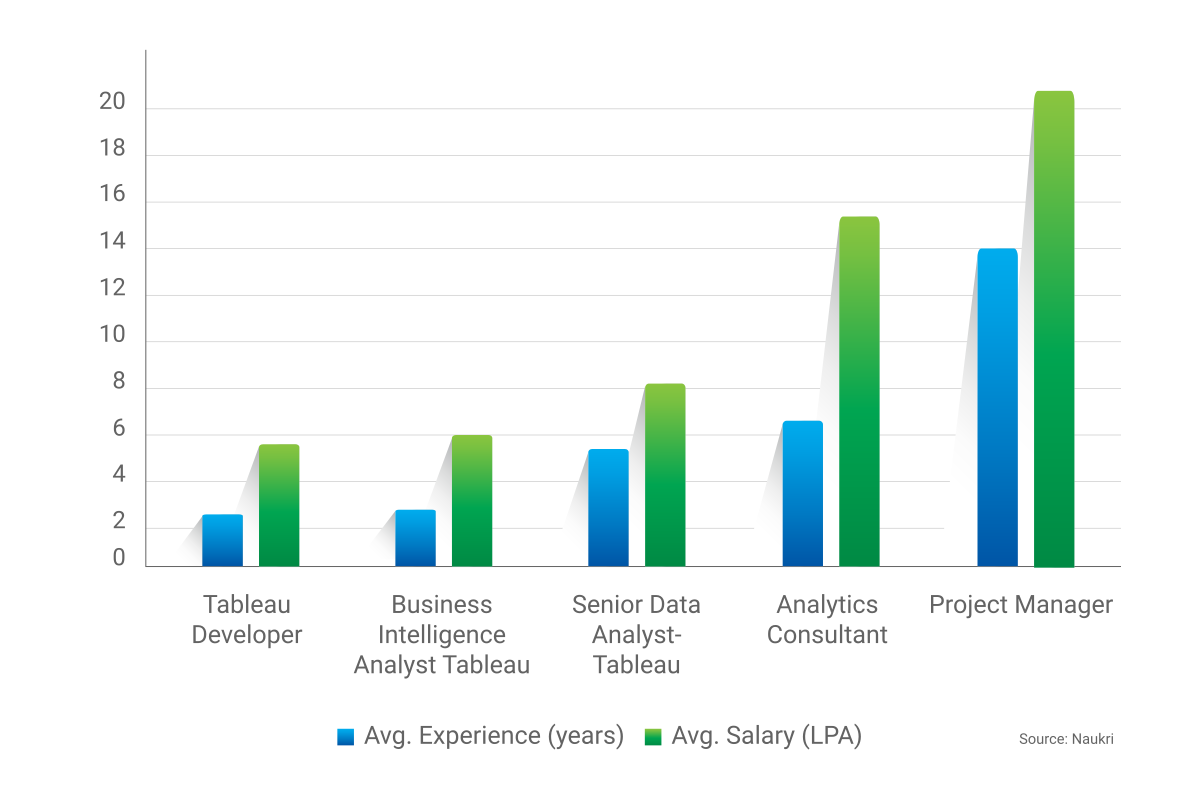
Salary comparision Graph :
Learning Path of Tableau Course :

Course Curriculum
Tableau
- Intro to Tableau Tool
- What is Data, Types of Data(Structured, Unstructured, Semi Structured), Visualization Basics, Different Visualization tools, Popularity of the Tools, Licencing Cost, Different Products of Tableau, Installation (Student ID), Connecting to Static Files, MySQL
- Data Pane Window
- Live Vs Extract, Data Source Window, Navigating to Work Sheet, Data Pane, Analytics Pane, Dimensions, Measures, Auto Generated Fields, Data Visualization Window Explanation, Data Source Window Operations
- Groups, Sets, Parameters
- Hierarchy(In-Built Hierarchy, Manual), Grouping, Sets, Parameter With Filters and Parameter With Sets, Usage of Meausre Names and Measure Values
- Filters in Tableau
- Dual Axis, Blended Axis, Dimension Filters, Measure Filters(Record Level Filters, Summary Level Filters), Date Filters, Cascading Filters, Context filters, Data Source Filters, Extract Filters,
- Calculated Fields
- Quick Table Calculations, Introduction to Calculated Fields, String Calculated Fields, Number Calculated Fields, Date Calculated Fields, Logical Calculated Fields, ZN Function
- Data Blending and Joins
- Mixing Up of All Calculated Fields, Conditional Formatting in Tableau, Data Blending, Data Joins, Unions, Relationships, Basic Charts and Use Cases, Introduction to Show Me, Development of In-Built Charts Part1,
- Charts in Tableau
- Development of In-Built Charts Part2, Customized Graphs(Donut, Waterfall, Bump, Barometer, Butterfly, Gauge meter, Basic Funnel, Advanced Funnel, Word Cloud, Gantt Bar), Animated Chart
- Reference Lines, Bands, Distributions
- Arbitary Formatting, Explaination of Marks Card, Reference Lines, Reference Bands, Reference Distribution
- LOD's, Intro to Dashboard, Story
- Forecasting, Introduction to Dashboard, Story Board Interfaces, LOD's(Fixed, Include, Exclude)
- Creating a Dashboard
- Creating of a Basic Dashboard With Both Tiled, Floating Layouts, Explaination of Objects in the Dashboard Interface, Action Filters on Dashboards
- Creating a Advanced Dashboard
- Advanced Level Dashboard(Drill Down Dashboards), Designing of Basic Story Board
- Tableau Public Server
- Publishing Dashboards on Tableau Public Server, Exposure to the Websites Which Consists of Real Time Data, Interview Cracking Resources, Introduction to Tableau Certification
Contact Our Team of Experts
Why ExcelR?
FAQs
What Is JUMBO PASS?
- The all new and exclusive JUMBO PASS is the latest initiative taken by ExcelR to offer you access to attend unlimited batches over the duration of 365 days. You will be able to attend unlimited number of classes for the course of your choice.
What is Data Visualization?
- Data visualisation is all about telling a story using visual graphics/images which cannot be told by data alone. Data visualisation should not be mistaken for beautiful aesthetic visuals, however it is about solving business problems.
What are the tools which we should be aware of for Data Visualization?
- Though there are umpteen number of data visualisation tools which follow the data visualisation principles. Tableau holds No.1 position in the leaders quadrant for data visualisation. Hence data visualisation training offered by ExcelR is exclusively on Tableau Desktop.
What are the various topics discussed? Do you cover other Data Visualisation tools apart from Tableau?
- The detailed course outline is provided on the website. The training covers 30 hours of concepts. Participants will also be trained on NodeXL which is majorly used for Network analysis.
Are data visualisation concepts required for me to be a Data Scientist?
- Yes, data visualisation is mandatory for all data scientists because they are expected to present the products / solutions to the clients. There are also jobs on data visualisation alone & Tableau alone.
Why should I choose ExcelR & not other training institute?
- Our trainers have 15+ years of experience in the field of their expertise from prestigious colleges such as IIT, ISB, IIM, etc. Also the training content which ExcelR provides is incomparable with any other training institute. We provide Tableau Server training along with Tableau Desktop training which makes your profile complete.
What Is Instructor-Led Online Training?
- Instructor-led online training is an interactive mode of training where participants and trainer will log in at the same time and live sessions will be done virtually. These sessions will provide scope for active interaction between you and the trainer.
How Many Batches Can I Attend, If Enrolled For Training?
- ExcelR offers a blended model of learning. In this model, you can attend classroom, instructor-led live online and e-learning (recorded sessions) with a single enrolment. A combination of these 3 will produce a synergistic impact on the learning. You can attend multiple Instructor-led live online sessions for one year from different trainers at no additional cost with the all new and exclusive JUMBO PASS.
Is This A Live Training Or Recorded Sessions?
- It is a live instructor-led interactive session which is done at a specific time where participants and trainer will log in at the same time. The same session will be also recorded and access will be provided to revise, recap or watch any missed session.
What If I Miss A Live Session?
- Not a problem even if you miss a live Tableau session for some reason. Every session will be recorded and access will be given to all the videos on ExcelR’s state-of-the-art Learning Management System (LMS). You can watch the recorded Tableau sessions at your own pace and convenience.
Will I Get A Tableau Course Completion Certification From ExcelR?
- Yes, after successfully completing the course you will be awarded a course completion certificate from ExcelR.
Whom Should I Contact If I Want More Information About The Training?
- You can reach out to us by visiting our website and interact with our live chat support team. Our customer service representatives will assist you with all your queries. You can also send us an email at enquiry@excelr.com with your query. Our Subject Matter Experts / Sales Team will clarify your queries or call us on 1800-212-2121 (Toll-Free number – India), +1(281) 971-3065 (USA), 800 800 9706 (India), 203-514-6638 (United Kingdom), 128-520-3240 (Australia).
What Are The Different Modes Of Payment Available?
- The different payment methods accepted by us are
- Cash
- Net Banking
- Cheque
- Debit Card
- Credit Card
- PayPal
- Visa
- Mastercard
- American Express
- Discover
Global Presence
ExcelR is a training and consulting firm with its global headquarters in Houston, Texas, USA. Alongside to catering to the tailored needs of students, professionals, corporates and educational institutions across multiple locations, ExcelR opened its offices in multiple strategic locations such as Australia, Malaysia for the ASEAN market, Canada, UK, Romania taking into account the Eastern Europe and South Africa. In addition to these offices, ExcelR believes in building and nurturing future entrepreneurs through its Franchise verticals and hence has awarded in excess of 30 franchises across the globe. This ensures that our quality education and related services reach out to all corners of the world. Furthermore, this resonates with our global strategy of catering to the needs of bridging the gap between the industry and academia globally.