Microsoft Azure Certification Course Training in Nagpur
Enroll in India's premier Azure Cloud Architect course that is based on an exhaustive and up-to-date curriculum, learn from experienced faculty who have hands-on expertise, and land a job as an Azure Cloud Engineer with our job-readiness program.
* Terms and Conditions apply

Students Enrolled
312


Course Path
Upcoming Batches
Select Your City
Can't find convenient schedule?
Program Highlights

Top-Notch Faculty

Case Studies & Capstone Projects

Exhaustive Course Curriculum

Lifetime Upgradation
Tools and Technologies

Azure Porta
Azure Powershell

Azure Price Calculator
Azure CLI

ARM Templates
Azure Container Instance
Azure Kubernetes Services

Azure App Services

Azure VPN

Azure Resource Manager

Azure Backup

Azure Storage

Azure Firewall

Azure Function

Azure Monitor

Front Door

Traffic Manager

Application Gateway

Cosmos DB
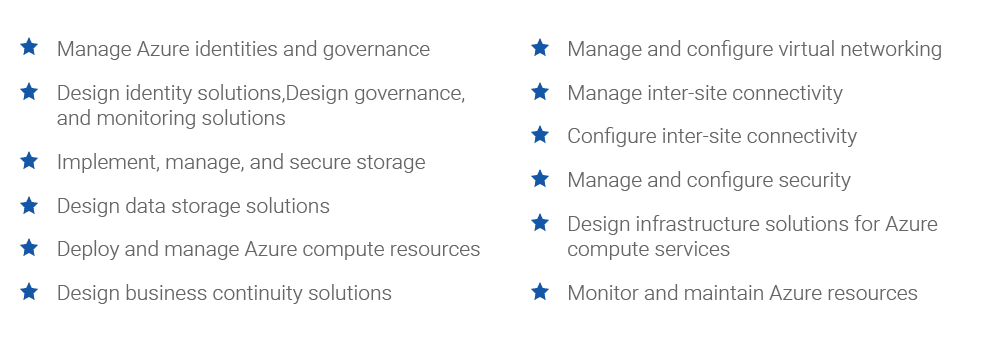
Skills Covered
Why ExcelR

Industry-Based Course Curriculum

Value Added Courses: Python, Linux, and AWS Technical Essentials

60+ Hours of Practical Internship Experience

Dedicated Support Team for Projects & Case Studies

Support through WhatsApp, Calls, & Emails

Lifetime eLearning Access
Projects
Project 1: Managing Azure Resources by Using the Azure Portal
- Beginner
- Explore the basic Azure administration capabilities associated with provisioning resources and organizing them. You will also explore options for protecting resources from being accidentally deleted while still allowing for modifying their performance characteristics and size.
Project 2: Virtual Networking Implementation with DNS
- Intermediate
- Explore Azure virtual networking capabilities by creating a virtual network in Azure that hosts a few Azure virtual machines, deploying them into different subnets of the virtual network, and ensuring that their private and public IP addresses do not change over time. Also protect the public endpoints and implement DNS name resolution.
Project 3: Managing Azure Storage
- Intermediate
- Evaluate use of Azure storage for storing files currently residing in on-premises data storage. Minimize the cost of storage by placing rarely accessed files in lower-priced storage tiers. Explore the different protection mechanisms that Azure Storage offers and determine suitability of Azure Files for hosting on-premises file shares.
Real-life Interview Case Studies
Project 1: Design a Governance Solution
- The solution involves creation of a management group hierarchy to organize subscriptions, track cost, ensure compliance with the requirements of sizing, naming, location, etc.
Project 2: Design Non-relational Storage
- The solution involves considering questions like what type of data is represented, what factors you will consider in your design, whether you will use blob access tiers and immutable storage, and how the content will be securely accessed. Your solution should consider the media, marketing literature, and corporate documents.
Project 3:Design an App Architecture Solution
- You will design an architecture for the customer images to be added to the company website by considering where the images should be stored, how you will ensure all images are scanned even when uploads are outpacing scanning, and how the customer will be notified, while incorporating the Well-Architected Framework.
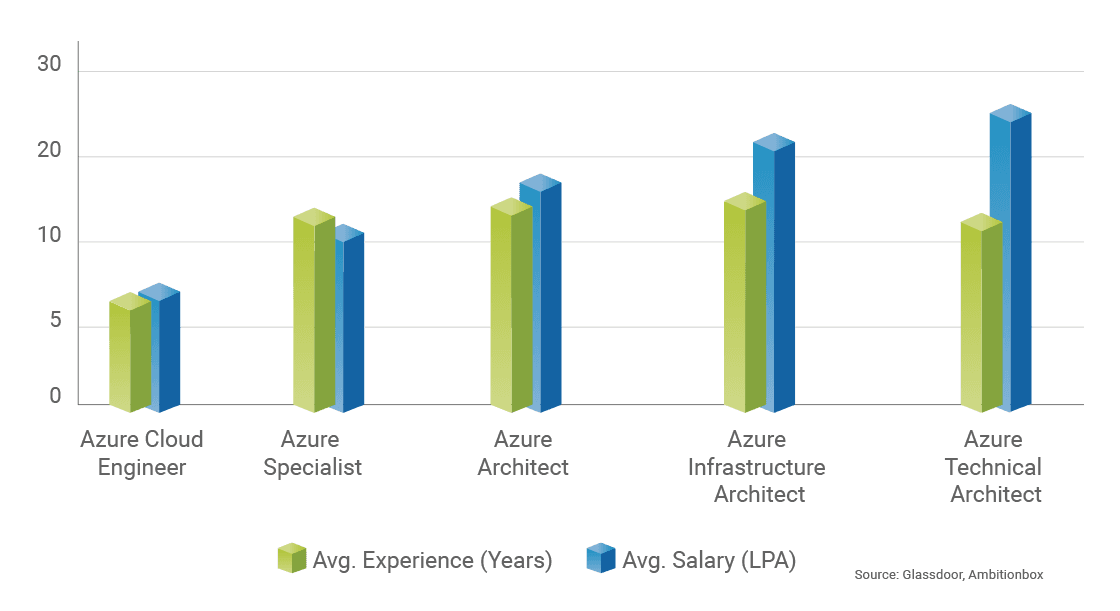
Career Progression and Salary Trends
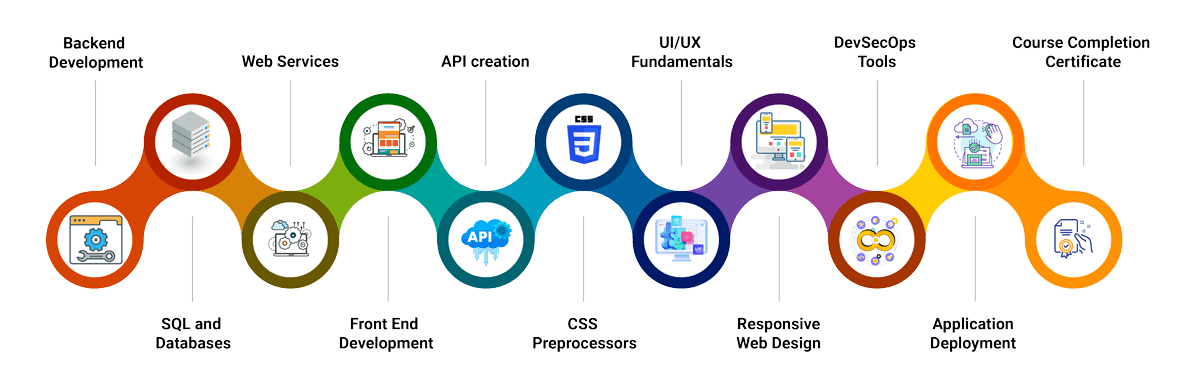
Learning Path
.png%2Fprocess_lp%2520(1)__1100x209.png&w=3840&q=70)
Course Curriculum
Module 1 : Introduction to Azure fundamentals
- Benefits of cloud services
- Cloud service types
- Introduction to Microsoft Azure
- Introduction to Cloud computing
- The shared responsibility model
- Cloud models
- Consumption based pricing
- High availability
- Scalability
- Reliability
- Predictability
- Security
- Governance
- Manageability
- Infrastructure as a Service
- Platform as a Service
- Software as a Service
- Review questions
- Summary
Module 2 : Core Azure architectural components
- Azure compute and networking services
- Azure storage services
- Azure identity, access, and security
- What is Microsoft Azure
- Azure accounts
- Azure physical infrastructure
- Azure management infrastructure
- Overview of Azure compute services
- Azure virtual machines
- Azure virtual desktop
- Azure containers
- Azure functions
- Application hosting options
- Virtual networking
- Virtual private networks
- Azure ExpressRoute
- Azure DNS
- Azure storage accounts
- Redundancy options
- Storage services
- Migration options
- File management
- Azure directory services
- Authentication methods
- External identities
- Conditional access
- Role-based access control
- Zero Trust security model
- Defense-in-depth
- Microsoft defender for cloud
- Review questions
- Summary
Module 3 : Governance and compliance
- Managing and deploying resources
- Cost management
- Azure blueprints
- Azure policy
- Resource locks
- Service Trust portal
- Azure portal, command line interface, and CloudShell
- Azure Arc
- Azure resource manager
- ARM templates
- Azure advisor
- Azure service health
- Azure monitor
- Review questions
- Factors that affect cost
- Azure pricing calculator
- Azure Total Cost of Ownership calculator
- Azure cost management tool
- Tags
- Summary
Module 4 : Introduces you to Azure Active Directory, and Users and Groups. Introduction to Active directory
- Introduction to Azure active directory
- Describe Azure Active Directory Benefits and Features
- Describe Azure AD Concepts
- Compare AD DS to Azure Active Directory
- Select Azure Active Directory Editions
- Implement Azure AD Device Identities
- Implement Self Service Password Reset
- Knowledge Check
- Summary
- Create User Accounts
- Manage User Accounts
- Create Bulk Accounts
- Create Group Accounts
- Assign Licenses to Users and Groups
- Create Administrative Units
- Demonstration - Users and Groups
- Knowledge Check
- Summary
Module 5 : Introduction to Governance and Compliance
- Identify Regions
- Implement Azure Subscriptions
- Obtain a Subscription
- Create Resource Groups
- Determine Resource Limits
- Create an Azure Resource Hierarchy
- Apply Resource Tagging
- Manage Costs
- Knowledge Check
- Summary
- Introduction to Azure policy
- Implement Azure Policy
- Create Azure Policies
- Create Policy Definitions
- Create Initiative Definitions
- Scope the Initiative Definition
- Determine Compliance
- Demonstration -Azure Policy
- Knowledge Check
- Summary
- Introduction to Role based access control
- Compare Azure RBAC Roles to Azure AD Roles
- Create a Role Definition
- Create a Role Assignment
- Apply RBAC Authentication
- Determine Azure RBAC Roles
- Demonstration - Azure RBAC
- Knowledge check
- Summary
Module 6 : Administrator tools, Azure Resource Manager, and Azure Resources Manager templates Introduction to administrative tools
- Introduction to ARM templates
- Use the Azure Portal
- Demonstration Azure Portal
- Use Azure Cloud Shell
- Demonstration Cloud Shell
- Use Azure PowerShell
- Demonstration - Working with PowerShell (optional)
- Use Azure CLI
- Demonstration Working with Azure CLI (optional)
- Knowledge Check
- Summary
- Review ARM Template Advantages
- Explore the ARM Template Schema
- Explore the ARM Template Parameters
- Consider Azure Bicep Templates
- Demonstration - QuickStart Templates
- Demonstration - Run Templates with PowerShell (optional)
- Knowledge Check
- Summary
Module 7 : Virtual Networking
- Introduction to network security groups
- Introduction to Firewall
- Introduction to Domain names
- Introduction to virtual networking
- Plan Virtual Networks
- Create Subnets
- Create Virtual Networks
- Plan IP Addressing
- Create Public IP Addresses
- Associate Public IP Addresses
- Associate Private IP Addresses
- Demonstration - Create Virtual Networks
- Knowledge Check
- Summary
- Implement Network Security Groups
- Determine NSG Rules
- Determine NSG Effective Rules
- Create NSG Rules
- Implement Application Security Groups (ASGs)
- Demonstration - NSGs
- Knowledge Check
- Summary
- Determine Azure Firewall Uses
- Create Azure Firewalls
- Create Azure Firewall Rules
- Knowledge Check
- Summary
- Identify Domains and Custom Domains
- Verify Custom Domain Names (optional)
- Create Azure DNS Zones
- Delegate DNS Domains
- Add DNS Record Sets
- Plan for Private DNS Zones
- Determine Private Zone Scenarios
- Demonstration - DNS Name Resolution
- Knowledge check
- Summary
Module 8 : Intersite Connectivity
- Introduction to ExpressRoute
- Introduction to Intersite Connectivity
- Determine VNet Peering Uses
- Determine Gateway Transit and Connectivity Needs
- Create VNet Peering
- Determine Service Chaining Uses
- Demonstration - VNet Peering
- Knowledge Check
- Summary
- Introduction
- Determine VPN Gateway Uses
- Create Site to Site Connections
- Create the Gateway Subnet
- Create the VPN Gateway
- Determine Gateway SKU and Generation
- Create the Local Network Gateway
- Setup the On Premises VPN Device
- Create the VPN Connection
- Determine High Availability Scenarios
- Demonstration - VPN Gateways
- Knowledge Check
- Summary
- Determine ExpressRoute Uses
- Determine ExpressRoute Capabilities
- Coexist Site to Site and ExpressRoute
- Compare Intersite Connection Options
- Determine Virtual WAN Uses
- Knowledge check
- Summary
Module 9 : Administer Network Traffic
- Knowledge check
- Introduction to Application Gateway
- Introduction to Network watcher
- Introduction to network traffic
- Review System Routes
- Identify User Defined Routes
- Examine a Routing Example
- Demonstration - Custom Routing Tables
- Determine Service Endpoint Uses and Services
- Identify Private Link Uses
- Summary
- Introduction to Load balancers
- Choose a Load Balancer Solution
- Implement a Public Load Balancer
- Implement an Internal Load Balancer
- Determine Load Balancer SKUs
- Create Backend Pools
- Create Load Balancer Rules
- Configure Session Persistence
- Create Health Probes
- Knowledge check
- Summary
- Implement Application Gateway
- Determine Application Gateway Routing
- Setup Application Gateway Components
- Knowledge Check
- Summary
- Describe Network Watcher Features
- Review IP Flow Verify Diagnostics
- Review Next Hop Diagnostics
- Visualize the Network Topology
- Knowledge Check
- Summary
Module 10 : Administer Azure Storage
- Introduction to storage security
- Introduction to Blobs
- Introduction to Azure storage
- Implement Azure Storage
- Explore Azure Storage Services
- Determine Storage Account Kinds
- Determine Replication Strategies
- Access Storage
- Secure Storage Endpoints
- Demonstration Secure Storage Endpoints
- Knowledge Check
- Summary
- Introduction
- Implement Blob Storage
- Create Blob Containers
- Create Blob Access Tiers
- Add Blob Lifecycle Management Rules
- Determine Blob Object Replication
- Demonstration - Blob Storage
- Knowledge Check
- Summary
- Review Storage-Security Strategies
- Create Shared Access Signatures
- Identify URI and SAS Parameters
- Demonstration - SAS in the Portal
- Determine Storage Service Encryption
- Create Customer Managed Keys
- Apply Storage Security Best Practices
- Knowledge Check
- Summary
- Compare Files to Blobs
- Manage File Shares
- Create File Share Snapshots
- Demonstration - File Shares
- Implement File Sync
- Identify File Sync Components
- Setup File Sync
- Configure Storage with Tools
- Knowledge Check
- Summary
Module 11 : Administer Azure Virtual Machines
- Introduction to Reliability (through Availability sets and Availability zones)
- Knowledge Check
- Administer PaaS Compute Options
- Introduction to App services
- Introduction to Azure virtual machines
- Review Cloud ServicesResponsibilities
- Plan Virtual Machines
- Determine Virtual Machine Sizing
- Determine Virtual Machine Storage
- Demonstration –Create Virtual Machines
- Connect to Virtual Machines
- Connect to Windows Virtual Machines
- Connect to Linux VirtualMachines
- Demonstration -Connect to Linux Virtual Machines (optional)
- Knowledge Check
- Summary
- Plan for Maintenance and Downtime
- Setup Availability Sets
- Review Update and Fault Domains
- Review Availability Zones
- Compare Vertical and Horizontal Scaling
- Create Scale Sets
- Configure Autoscale
- Demonstration – Virtual Machine Scaling
- Summary
- Introduction to Extensions
- Implement Virtual Machine Extensions
- Implement Custom Script-Extensions
- Implement Desired State Configuration
- Demonstration Custom Script Extensions
- Knowledge Check
- Summary
- Introduction to PaaS services
- Implement Azure App Service Plans
- Determine App Service Plan Pricing
- Scale Up and Scale Out the App Service
- Configure App Service Plan Scaling
- Demonstration -Create an App Service Plan
- Knowledge Check
- Summary
- Implement Azure App Services
- Create an App Service
- Create Deployment Slots
- Add Deployment-Slots
- Secure an App Service
- Create Custom Domain Names
- Backup an App Service
- Use Application Insights
- Demonstration – Create an App Service
- Knowledge Check
- Summary
Module 12 : Administer Data Protection
- Introduction to disaster recovery
- Introduction to data protection
- Describe Azure Backup Benefits
- Implement Azure Backup Center
- Setup Recovery Service Vault Backup Options
- Demonstration – Backup Azure File Shares
- Configure On-Premises File and Folder Backups
- Manage the Azure Recovery Services Agent
- Demonstration – Backup Files and Folders
- Knowledge Check
- Summary
- Protect Virtual Machine Data
- Create Virtual Machine Snapshots
- Setup Recovery Services Vault Backup Options
- Backup Virtual Machines
- Restore Virtual Machines
- Implement Azure Backup Server
- Compare Backup Options
- Manage Soft Delete
- Implement Azure Site Recovery
- Demonstration – Virtual Machine Backups
- Knowledge Check
- Summary
Module 13 : Administer Monitoring
- Introduction to monitor alerts
- Introduction to log analytics
- Introduction to monitor
- Describe Azure Monitor Key Capabilities
- Describe Azure Monitor Components
- Define Metrics and Logs
- Identify Data Types
- Describe Activity Log Events
- Query the Activity Log
- Knowledge Check
- Summary
- Manage Azure Monitor Alerts
- Create Alert Rules
- Create Action Groups
- Demonstration - Alerts
- Knowledge Check
- Summary
- Determine Log Analytics Uses
- Create a Workspace
- Visualize Log Analytics Data
- Structure Log Analytics Queries
- Demonstration – Log Analytics
- Knowledge Check
- Summary
Contact Our Team of Experts
Why ExcelR?
FAQs
How Azure is useful to me?
- Microsoft Azure a Cloud Platform services is fast growing Cloud Service provider in IT industry. As Cloud becoming more popular and competitive in the market there are lot of Career opportunities in the Market for Azure Architect.
Will I clear Azure Certification ?
- Yes, This Course is aligned with AZ - 100 and AZ - 101 Certifications of Microsoft Azure Role based exams.
I am a fresher, how does it help me?
- As a fresher you can easily grab the opportunity of the jobs available in the market as lot of companies opting for Azure ( IaaS)
What Is JUMBO PASS?
- The all new and exclusive JUMBO PASS is the latest initiative taken by ExcelR to offer you access to attend unlimited batches over the duration of 365 days. You will be able to attend unlimited number of classes for the course of your choice.
What Is Instructor-Led Online Training?
- Instructor-led online training is an interactive mode of training where participants and trainer will log in at the same time and live sessions will be done virtually. These sessions will provide scope for active interaction between you and the trainer.
How Many Batches Can I Attend, If Enrolled For Training?
- ExcelR offers a blended model of learning. In this model, you can attend classroom, instructor-led live online and e-learning (recorded sessions) with a single enrolment. A combination of these 3 will produce a synergistic impact on the learning. You can attend multiple Instructor-led live online sessions for one year from different trainers at no additional cost with the all new and exclusive JUMBO PASS.
Is This A Live Training Or Recorded Sessions?
- It is a live instructor-led interactive session which is done at a specific time where participants and trainer will log in at the same time. The same session will be also recorded and access will be provided to revise, recap or watch any missed session.
What If I Miss A Live Session?
- Not a problem even if you miss a live Azure session for some reason. Every session will be recorded and access will be given to all the videos on ExcelR’s state-of-the-art Learning Management System (LMS). You can watch the recorded Azure sessions at your own pace and convenience.
Will I Get A Azure Course Completion Certification From ExcelR?
- Yes, after successfully completing the course you will be awarded a course completion certificate from ExcelR.
Whom Should I Contact If I Want More Information About The Training?
- You can reach out to us by visiting our website and interact with our live chat support team. Our customer service representatives will assist you with all your queries. You can also send us an email at enquiry@excelr.com with your query. Our Subject Matter Experts / Sales Team will clarify your queries or call us on 1800-212-2121 (Toll-Free number – India), +1(281) 971-3065 (USA), 800 800 9706 (India), 203-514-6638 (United Kingdom), 128-520-3240 (Australia).
What Are The Different Modes Of Payment Available?
- The different payment methods accepted by us are
- Cash
- Net Banking
- Cheque
- Debit Card
- Credit Card
- PayPal
- Visa
- Mastercard
- American Express
- Discover
Global Presence
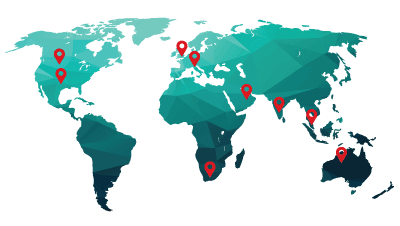
ExcelR is a training and consulting firm with its global headquarters in Houston, Texas, USA. Alongside to catering to the tailored needs of students, professionals, corporates and educational institutions across multiple locations, ExcelR opened its offices in multiple strategic locations such as Australia, Malaysia for the ASEAN market, Canada, UK, Romania taking into account the Eastern Europe and South Africa. In addition to these offices, ExcelR believes in building and nurturing future entrepreneurs through its Franchise verticals and hence has awarded in excess of 30 franchises across the globe. This ensures that our quality education and related services reach out to all corners of the world. Furthermore, this resonates with our global strategy of catering to the needs of bridging the gap between the industry and academia globally.