
Advanced Excel Certification Training in Noida
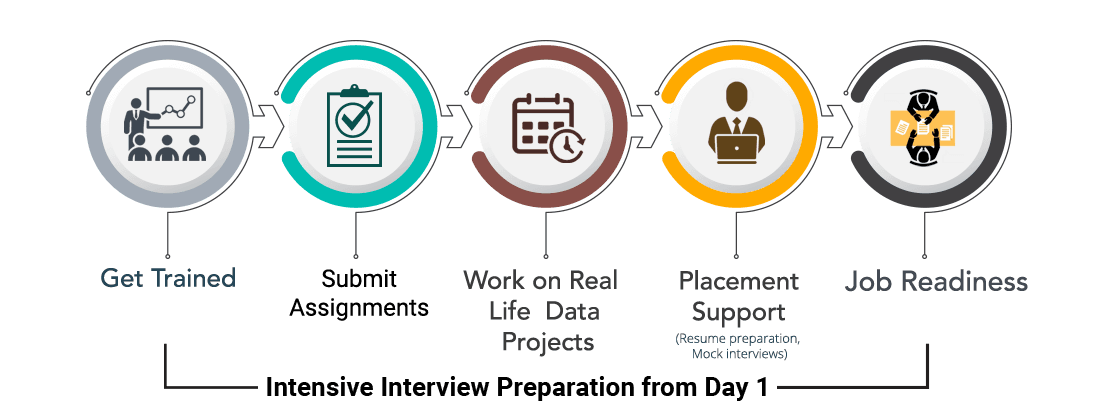
ExcelR’s Advanced Excel Course Training comes with an industry-relevant curriculum and is taught by experts who have hands-on experience. You also get intensive interview prep right from Day 1, which prepares you for interviews with our network of 2000+ hiring partners.





You May Have Heard About Offers, But Have You Heard Of ExcelR's JUMBO PASS? Well, Here's Your Chance To Avail The JUMBO PASS!! Watch The video

Upcoming Batches
Select Your City
Can't find convenient schedule?
Program Highlights

Assignments and Case Studies
Work hands-on with 20+ case studies, assignments, and labs with mentor support.

Real-life Excel Projects
Work on 5+ real-life projects with mentor support to get applied understanding.

Job Readiness
Intensive interview preparation from Day 1 to prepare candidates for interviews with our network of 2000+ hiring partners.

Lifetime Access to LMS
Access live class recordings, study materials, and quizzes to recap concepts.
Skills Covered

Data Cleaning

Data Analysis & Visualization

Interactive Dashboards

Macros & VBA
Projects
Zomato Pune(Domain: Service Industry)
- The objective is to find out which variables drive good ratings for the restaurants. Also find out which 'Sponsor' has the most popular restaurant brands registered on Zomato. At the end, create a logical storyline for Pune residents and their preferences, along with a Dashboard.
COVID19 Data (Domain: Healthcare)
- Do time series analysis on the data. Determine the trends in “confirmed”, “deceased”, and “recovered” cases as per location. Create a logical storyline at the end, with a Dashboard.
Employee Preference (Domain: Operations)
- You are in discussions with a consulting company for providing transport for their employees. For this purpose, you are tasked with understanding how their employees prefer to commute presently (between home and the office). What is the general behavior and preference, in terms of male vs female employees, for transport in the given dataset? Create a logical storyline at the end, with a Dashboard which can clearly give employee preferences.
Learning Path
Why ExcelR

Industry-Based Course Curriculum

Value-Added Course: Tableau (self-paced)

Work Hands-On With 5+ Real-Life Projects

Dedicated Placement Cell

Support through WhatsApp, Calls, & Emails

Lifetime eLearning Access
Course Curriculum
Module 1 - Advanced Excel
- Introduction
- MS office Versions(similarities and differences)
- Interface(latest available version)
- Row and Columns
- Keyboard shortcuts for easy navigation
- Data Entry(Fill series)
- Find and Select
- Clear Options
- Ctrl+Enter
- Formatting options(Font,Alignment,Clipboard(copy, paste special))
- Referencing, Named ranges,Uses,Arithemetic Functions
- Mathematical calculations with Cell referencing(Absolute, Relative, Mixed)
- Functions with Name Range
- Arithmetic functions(SUM, SUMIF, SUMIFS, COUNT, COUNTA, COUNTIFS, AVERAGE, AVERAGEIFS, MAX, MAXIFS, MIN, MINIFS)
- Logical functions
- Logical functions:IF,AND,OR,NESTED IFS,NOT,IFERROR
- Usage of Mathematical and Logical functions nested together
- Referring data from different tables: Various types of Lookup, Nested IF
- LOOKUP
- VLOOKUP
- NESTED VLOOKUP
- HLOOKUP
- INDEX
- INDEX WITH MATCH FUNCTION
- INDIRECT
- OFFSET
- Advanced functions
- Combination of Arithmatic
- Logical
- Lookup functions
- Data Validation(with Dependent drop down)
- Date and Text Functions
- Date Functions: DATE, DAY, MONTH, YEAR, YEARFRAC, DATEDIFF, EOMONTH
- Text Functions: TEXT, UPPER, LOWER, PROPER, LEFT, RIGHT, SEARCH, FIND, MID, TTC, Flash Fill
- Data Handling::Data cleaning, Data type identification, Remove Duplicates, Formatting and Filtering
- Number Formatting(with shortcuts)
- CTRL+T(Converting into an Excel Table)
- Formatting Table
- Remove Duplicate
- SORT
- Advanced Sort
- FILTER
- Advanced Filter
- Data Visualization: Conditional Formatting, Charts
- Conditional formatting(icon sets/Highlighted colour sets/Data bars/custom formatting)
- Charts: Bar, Column, Lines, Scatter, Combo, Gantt, Waterfall, pie
- Data Summarization: Pivot Report and Charts
- Pivot Reports: Insert, Interface, Crosstable Reports, Filter, Pivot Charts,
- Slicers: Add, Connect to multiple reports and charts
- Calculated field, Calculated item
- Data Summarization: Dashboard Creation, Tips and Tricks
- Dashboard: Types, Getting reports and charts together, Use of Slicers.
- Design and placement: Formatting of Tables, Charts, Sheets, Proper use of Colours and Shapes
- Connecting to Data: Power Query, Pivot, Power Pivot within Excel
- Power Query: Interface, Tabs
- Connecting to data from other excel files, text files, other sources
- Data Cleaning
- Transforming
- Loading Data into Excel Query
- Connecting to Data: Power Query, Pivot, Power Pivot within Excel
- Using Loaded queries
- Merge and Append
- Insert Power Pivot
- Similarities and Differences in Pivot and Power Pivot reporting
- Getting data from databases, workbooks, webpages
- VBA and Macros
- View Tab
- Add Developer Tab
- Record Macro:Name,Storage
- Record Macro to Format table(Absolute Ref)
- Format table of any size(Relative ref)
- Play macro by button
- shape
- as command(in new tab)
- Editing Macros
- VBA:Introduction to the basics of working with VBA for Excel: Subs, Ranges, Sheets
- Comparing values and conditions
- if statements and select cases
- Repeat processes with For loops and Do While or Do Until Loops
- Communicate with the end-user with message boxes and take user input with input boxes, User Form
Contact Our Team of Experts
Why ExcelR?
FAQs
What Is JUMBO PASS?
- The all new and exclusive JUMBO PASS is the latest initiative taken by ExcelR to offer you access to attend unlimited batches over the duration of 365 days. You will be able to attend unlimited number of classes for the course of your choice.
What is Data Visualization?
- Data visualisation is all about telling a story using visual graphics/images which cannot be told by data alone. Data visualisation should not be mistaken for beautiful aesthetic visuals, however it is about solving business problems.
Why should I choose ExcelR & not other training institute?
- Our trainers have 15+ years of experience in the field of their expertise from prestigious colleges such as IIT, ISB, IIM, etc. Also the training content which ExcelR provides is incomparable with any other training institute. We provide Advanced Excel training which makes your profile complete.
What Is Instructor-Led Online Training?
- Instructor-led online training is an interactive mode of training where participants and trainer will log in at the same time and live sessions will be done virtually. These sessions will provide scope for active interaction between you and the trainer.
How Many Batches Can I Attend, If Enrolled For Training?
- ExcelR offers a blended model of learning. In this model, you can attend classroom, instructor-led live online and e-learning (recorded sessions) with a single enrolment. A combination of these 3 will produce a synergistic impact on the learning. You can attend multiple Instructor-led live online sessions for one year from different trainers at no additional cost with the all new and exclusive JUMBO PASS.
Is This A Live Training Or Recorded Sessions?
- It is a live instructor-led interactive session which is done at a specific time where participants and trainer will log in at the same time. The same session will be also recorded and access will be provided to revise, recap or watch any missed session.
What If I Miss A Live Session?
- Not a problem even if you miss a live Advanced Excel session for some reason. Every session will be recorded and access will be given to all the videos on ExcelR’s state-of-the-art Learning Management System (LMS). You can watch the recorded Advanced Excel sessions at your own pace and convenience.
Will I Get An Advanced Excel Course Completion Certification From ExcelR?
- Yes, after successfully completing the course you will be awarded a course completion certificate from ExcelR.
Whom Should I Contact If I Want More Information About The Training?
- You can reach out to us by visiting our website and interact with our live chat support team. Our customer service representatives will assist you with all your queries. You can also send us an email at enquiry@excelr.com with your query. Our Subject Matter Experts / Sales Team will clarify your queries or call us on 1800-212-2121 (Toll-Free number – India), +1(281) 971-3065 (USA), 800 800 9706 (India), 203-514-6638 (United Kingdom), 128-520-3240 (Australia).
What Are The Different Modes Of Payment Available?
- The different payment methods accepted by us are
- Cash
- Net Banking
- Cheque
- Debit Card
- Credit Card
- PayPal
- Visa
- Mastercard
- American Express
- Discover
Global Presence
ExcelR is a training and consulting firm with its global headquarters in Houston, Texas, USA. Alongside to catering to the tailored needs of students, professionals, corporates and educational institutions across multiple locations, ExcelR opened its offices in multiple strategic locations such as Australia, Malaysia for the ASEAN market, Canada, UK, Romania taking into account the Eastern Europe and South Africa. In addition to these offices, ExcelR believes in building and nurturing future entrepreneurs through its Franchise verticals and hence has awarded in excess of 30 franchises across the globe. This ensures that our quality education and related services reach out to all corners of the world. Furthermore, this resonates with our global strategy of catering to the needs of bridging the gap between the industry and academia globally.